Showing posts with label Validation. Show all posts

17 Nov 2013

Validating dates with af:validateDateTimeRange validator

Sometimes we need to validate that the date entered in an af:inputDate component is within some range. ADF Faces provides a very convenient approach for that - af:validateDateTimeRange. It is very easy to use and it could look like this in a jspx code:
<af:inputDate value="#{dateValue}">
   <af:validateDateTimeRange minimum="#{minimumValue}"
        maximum="#{maximumValue}"
        messageDetailNotInRange="The date value {1} is not in the range {2} - {3}"
        /> 
</af:inputDate>
But there is some pitfall to be aware.

Let's say we've got some ViewObject with three oracle.jbo.domain.Date attributes - ValueDate, MaturityDate and PaymentDate:


We put correspondent inputDate components on a page and set up autoSubmit attribute for ValueDate and MaturityDate:

 
We need to keep the value of PaymentDate within the range between ValueDate and MaturityDate. So, w're going to add a validator to the PaymentDate:

<af:inputDate value="#{bindings.PaymentDate.inputValue}"
              label="#{bindings.PaymentDate.hints.label}"
              required="#{bindings.PaymentDate.hints.mandatory}"
              columns="#{bindings.PaymentDate.hints.displayWidth}"
              shortDesc="#{bindings.PaymentDate.hints.tooltip}"
              id="id3">
  <f:validator binding="#{bindings.PaymentDate.validator}"/>
  <af:convertDateTime pattern="#{bindings.PaymentDate.format}"/>
  
  <af:validateDateTimeRange minimum="#{bindings.Valuedate.inputValue.value}"
                            maximum="#{bindings.Maturitydate.inputValue.value}"
                            />
  
</af:inputDate>


And let's test it now:

The error message is absolutely correct since PaymentDate is less than ValueDate.


The value of PaymentDate is equal to ValueDate and it is within the range ValueDate-MaturityDate. So there is no any validation exception.
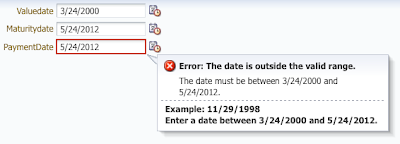


Ooops!  The value of PaymentDate is equal to MaturityDate and it is within the range ValueDate-MaturityDate. But the validation exception is fired.
We can figure out the reason of this strange behavior in the specification of the maximum attribute of the af:validateDateTimeRange:

"... When binding to Date objects, it is advised to create the Date object with maximum value for any date-time components that aren't displayed (usually hours, minutes, seconds, milliseconds) to allow the largest range of values to be accepted."

So, in order to get it working correctly, it is advised to specify in the maximum attribute of the validateDateTimeRange something like this: "5/24/2012 23:59:59.999".

Let's give it what it wants. In our ViewObject we created a transient oracle.jbo.domain.Date attribute LimitMaturityDate with the following value expression:

 The expression actually adds a day (24 hours) to the Maturitydate and subtracts a milisecond, so we're going to get "Maturitydate 23:59:59.999". The new java.sql.Timestamp object is going to be converted into the oracle.jbo.domain.Date by the framework. And let's use this transient attribute as a maximum for the af:validateDateTimeRange:
  <af:validateDateTimeRange minimum="#{bindings.Valuedate.inputValue.value}"
                            maximum="#{bindings.LimitMaturityDate.inputValue.value}"
                            />


And if we test it again:


It will work fine.


That's it!

21 Apr 2012

How to avoid validation of immediate inputs

Introduction
Setting the immediate attribute of JSF/ADF command components to true is not the silver bullet that can help you to avoid validation. This is explained in the Understanding the JSF Immediate attribute post. If you have immediate input controls on the same form, these controls are going to be validated in any case. But immediate input controls could be quite useful as it was shown in the Update model in the ValueChangeListener post.  So, let's say you have immediate required inputText and immediate commandButton (some "Cancel" button) on the same form. Leaving the inputText empty will cause a validation error when the commandButton is pressed.


This post is showing a technique of using some "super" Immediate button, that can help us to really avoid validation in any case. So, our "super" Immediate button looks like this:

   <af:commandButton text="Cancel" id="cb1" 
                      actionListener="#{TestBean.buttonActionListener}"        
                      immediate="true"
                      action="someAction">
                      
      <af:clientAttribute name="superImmediate" value="#{true}"/>                
      <af:clientListener method="catchActionEvent" type="action"/>
      <af:serverListener type="customButtonAction"
                         method="#{TestBean.customButtonActionListener}"/>

    </af:commandButton>                   


And a little bit of Java Script:
   <af:resource type="javascript">  
     
     // This hack avoids client-side validation for the "superImmediate"
     // commandComponents
     AdfActionEvent.prototype.isValidationNeeded = function()
       {
         return !this.getSource().getProperty("superImmediate");
       } 
       
    // Action event will cause server-side validation at the
    // Apply Request Values phase (for immediate button).
    // So we'll get validation error even if the client-side validation is suppressed
    // We need to catch the original Action event, cancel it and replace with our
    // custom event customButtonAction.
    function catchActionEvent(evt){
      AdfCustomEvent.queue(evt.getSource(), 'customButtonAction' , null, true); 
      evt.cancel();                  
    }   
    
   </af:resource>


And finally we need to emulate an Action Event in our customButtonActionListener in order to get the button's actionListener executed and the action processed:

  public void customButtonActionListener(ClientEvent clientEvent) {
      UIXCommand cb = (UIXCommand) clientEvent.getComponent();
      cb.broadcast(new ActionEvent(cb));
  }


That's it!

31 Mar 2012

Update model in the ValueChangeListener

After reading of the Understanding the JSF Immediate Attribute post, my friend asked me whether there is any sense to use the Immediate attribute for inputTexts. The answer is Yes, off course. In general we set the Immediate to true when we need to validate the component and execute its value change events before the common validation process, before the Process Validation phase. We move up the validation and the value change events processing to the Apply Request Values phase. In other words, we split our components into two parts: front-line or Immediate inputs that are validated first at the Apply Request Values and all others that are validated later at the usual Process Validation phase. In this post I'm going to show one of use-cases when the Immediate attribute for inputTexts could be useful.
Let's say we have two inputTexts:

        <af:inputText label="Label Value" id="it1"
                      value="#{backing_Main.labelValue}" autoSubmit="true"
                      />

        <af:inputText label="#{backing_Main.labelValue}" id="it2"
                      partialTriggers="it1"/>

The first one stores its value in some backing bean property (in the model), and the second input reads this property to render its label. The first input is autosubmit and it partially triggers the second input, so when we change value of the first input and press Tab, label of the second one is going to be changed immediately. At this point both inputs are not Immediate and everything works fine:

Let's change the required attribute of the second input to true and we get validation error:

To resolve this issue let's set Immediate of the first input to true and add a valueChangeListener. In the valueChangeListener we need to manually update model for the first input because we are going to skip all the subsequent phases (including Update Model phase) except Render Response:

   public void labelListener(ValueChangeEvent valueChangeEvent)
  { UIComponent c = valueChangeEvent.getComponent();
    
    //This step actually invokes Update Model phase for this 
    //component
    c.processUpdates(FacesContext.getCurrentInstance());
    
    //Jump to the Render Response phase in order to avoid 
    //the validation
    FacesContext.getCurrentInstance().renderResponse();
  }

And it works fine again:


That's it!

2 May 2011

Adding Groovy validation expression programmatically

In this post I'm going to show how you can add Groovy validation rule for an entity's attribute programmatically "on-the-fly". When you build Groovy expression to validate the value of an attribute, you can use predefined keywords "newValue" and "oldValue" referring to the old and new values of the attribute correspondingly.
In the following piece of code we can see how to add Groovy validation expression for some attribute checking that new value of the attribute is not greater than 20:

    //Groovy validation expression
    private static final String VALIDATION_EXPR="newValue <= 20";
    
    //Keyword in the message bundles resource file
    //exprvalue_err=Value must not be greater than {0}   
    private static final String EXPR_VALUE_ERROR="exprvalue_err";    
    private static final int EXPR_MAX_VALUE=20;    
    
    private void addExpressionValidator(AttributeDef at) {
        //creating new validator
        JboExpressionValidator jcv = new JboExpressionValidator(false, VALIDATION_EXPR);
        
        //setting error message
        jcv.setErrorMsgId(EXPR_VALUE_ERROR);
        
        //setting value for the message's token {0}
        HashMap errvaluesMap = new HashMap();
        errvaluesMap.put("0", EXPR_MAX_VALUE);         
        jcv.setErrorMsgExpressions(errvaluesMap);                
        
        //adding validator to the attribute's validators list
        ((AttributeDefImpl) at).addValidator(jcv);
    }


That was really easy!

20 Feb 2011

ADF BC. Adding validation rules to Entity object.

If you need to add validation rule to programmatically created Entity object or you just have to add some rules to the entity's attribute "on the fly",  you should use implementing classes of JboValidatorInterface. ADF Model's Java API has appropriate implementing class for each validation type. If you need something "special", you can create your own implementation of JboValidationInterface.
In this post I'm going to show a couple of examples of using JboValidator classes.

The following method creates validator to control the maximum length of some entity's attribute:
private JboLengthValidator getLengthValidator(Integer maxLength) {
        //Create validator    
        JboLengthValidator jlv = new JboLengthValidator();
        //Set operation type
        jlv.setOperType(jlv.LESSTHANEQUALTO);
        //Set the value to compare with
        jlv.setRhsValue(maxLength);
           
        //Refer to error message in resource bundle 
        jlv.setErrorMsgId(MAX_LENGTH_ERROR);
        //Populate parameter value for error message
        HashMap errvaluesMap = new HashMap();
        errvaluesMap.put("0", maxLength.toString());         
        jlv.setErrorMsgExpressions(errvaluesMap);
    
        return jlv;
    }

    //The key in your resource bundle properties file.
    // It contains error message like this:
    // maxlength_err=The maximum length is {0} characters 
    private static final String MAX_LENGTH_ERROR="maxlength_err"; 


The next validator is responsible for checking minimum value of some attribute:
private JboCompareValidator getMinValueValidator(Integer minValue) {
        JboCompareValidator jcv = 
            new JboCompareValidator(false,
                                    JboCompareValidator.GREATERTHANEQUALTO, 
                                    minValue);
        jcv.setErrorMsgId(MIN_VALUE_ERROR);
        HashMap errvaluesMap = new HashMap();
        errvaluesMap.put("0", minValue.toString());         
        jcv.setErrorMsgExpressions(errvaluesMap);        
        return jcv;
    }
    
    //minvalue_err=The minimum value is {0}
    private static final String MIN_VALUE_ERROR="minvalue_err";    

And at last the piece of code to add the validators to some attribute:
private void addValidators(AttributeDefImpl at, 
                               Integer maxLength, 
                               Integer minValue) {
        if (maxLength!=0) 
            at.addValidator(getLengthValidator(maxLength));  

        if (minValue!=0) 
            at.addValidator(getMinValueValidator(minValue));  
    }

That's it!